Showing posts with label maccdc. Show all posts
Showing posts with label maccdc. Show all posts
Wednesday, March 19, 2014
Labels:
CTF
,
maccdc


Read More
MACCDC 2014: Virtual Quals Lesson Learned
MACCDC 2014 - Virtual Qualifier Round
Some found my MACCDC 2013 write-up helpful, and more information is always better, so here's this year's lesson learned for the virtual qualifier round.
Choose a later time slot
This lesson is pretty subjective and I don't mean for it to sound negative or whiny, so please keep that in mind.
We chose one of the first time slots available this year in which to compete, and right after we were told "go!" we saw problems with the game infrastructure. The external IP addresses listed on the Flags tab were different than those listed on the Assets tab.
Here's a modified view of the Assets tab:
And here's the modified view of the Flags tab:
Struggling for Control
We connected to the external IP addresses on the Assets tab according to what team member was tasked to a respective system and tried to start the system hardening. Within the first 10 minutes, we noticed odd behavior that wasn't attributable to red team activity. We saw multiple sessions on Linux boxes and there were RDP battles on Windows. We then found out that our assets were swapped with those of another college! Once the game masters were aware of the issue, they started working on the fix.
In the mean time, all teams retained access to the systems to which they were connected. This meant that teams could still scour the systems to look for flag values to be submitted once the assets were re-aligned, as well as continue hardening their boxes. At this point, injects weren't assigned, so they weren't a concern.
Access Restored?
Once all machines were fixed in the scoreboard to be assigned to the correct teams, the games masters graciously reset the game clock. However, they did not reset the machines or the flags teams may have already captured. Of concern on that point is that according to the rules, whichever team submits flags first wins in the event of a tie. Well, with the start and end times now adjusted, we quickly went back to work.
Nope, Still Broken
Even after the game was reset, when we tried submitting flag values, they were not accepted by the scoreboard. The problem was that when you click on a flag to submit the value, although the main entry in the list was re-mapped correctly, the pop-up flag submission prompt still reported the old system. We had to take screen caps to prove what we were saying, as the game masters didn't believe us.
Conclusion
Now that you have a sense of the issues we were facing, I would recommend not choosing an initial time slot for fear of the game infrastructure being "buggy". The thought process behind this is that if your team chooses a later slot, then maybe by then the issues will be resolved and the game experience will be smooth. From a practical perspective, the time spent having to converse with the game masters about what is broken and why takes away time from your focus on system hardening, etc.
Something we found interesting is that not a single team from our round progressed to regionals...
Tuesday, March 18, 2014
Labels:
CTF
,
maccdc
Read More
MACCDC 2014: Sahana Eden Write-Up
This year, I was tasked to a linux box, even though my greater strength is in Windows. With the theme of this year's MACCDC being related to disaster recovery, I discovered the distro I had was Sahana Eden.


The tl;dr of this part is that I recommend once you learn of the MACCDC theme, look for related open-source linux distros (virtual appliances). Download a couple and mess around with them. Who knows, you might get lucky and pick the actual distro used in the qualifiers. At best, it will save you time once the competition starts and at worst you'll still learn to navigate your way around a linux box if you already aren't familiar.
What am I getting myself into?
Sahana Eden is, from their description:
... an Emergency Development ENvironment platform for rapid deployment of humanitarian response management. Its rich feature set can be rapidly customized to adapt to existing processes and integrate with existing systems to provide effective solutions for critical humanitarian needs management either prior to or during a crisis.If you'd like to download it yourself for experimentation, click here.
The Sahana Eden distro has webmin running by default, which coincidentally was a monitored service by the scorebot. Webmin, if you're not familiar (because I'd never seen it before!) is a web-based linux administration portal. By default, it was only accessible from internal addresses so you could only access it on the local host itself or from another asset. I debated trying to modify the configuration files to make it externally accessible, but since our Active Directory guy had his system set already I used his box to look at the webmin portal for anything useful. One less external vector for the red team, right? Since I'd never seen it, I originally assumed it was the web-app itself. Once I figured out that it wasn't, I was able to re-focus my attention on getting Sahana Eden up and running.
Sahana Eden Administration
First, let me say that the Sahana Eden documentation in terms of administration is not something you want to have to weed through during competition time, because the paths listed on the turnkeylinux site and the wiki are confusing and potential time-wasters.
The screenshot for Sahana Eden administration shows it being accessible via Web2Py:


The screenshot for Sahana Eden administration shows it being accessible via Web2Py:
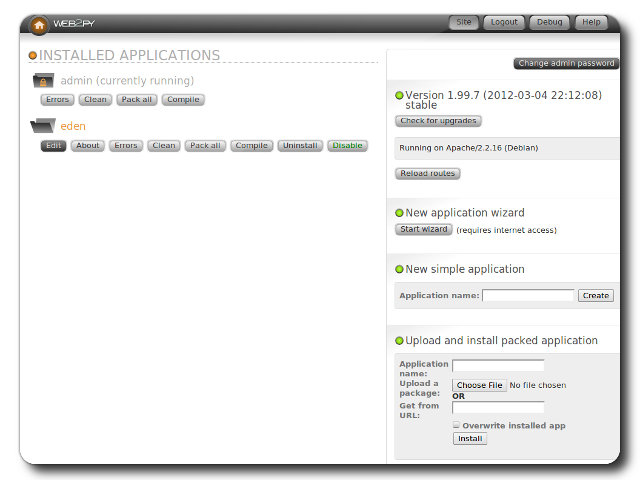
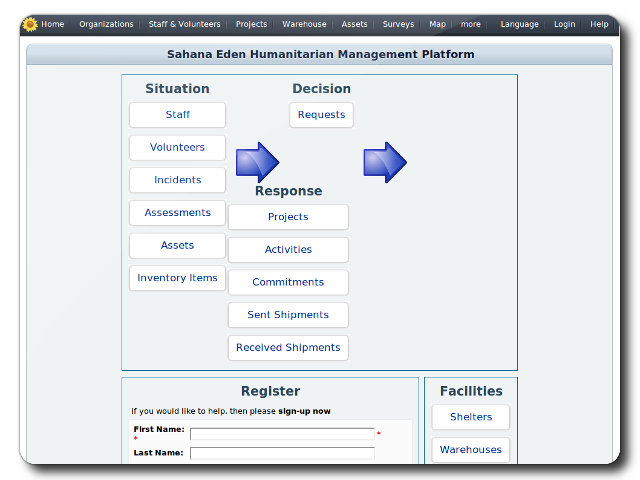
To clarify though, this isn't really web-app administration in the sense of application-specific settings. It's more about installing the eden app itself. So where then do you go to manage the app? Many web-apps have an administration portal off the customer-facing component, which is accessible after you log in. The customer-facing portal of Sahana Eden looks like this:
According to the turnkey linux page:
first registered user will become the administrative user account
Seems simple, right? Riiiiiiiight... Attempting to create a user resulted in a database error. That means I need to fix the database issue before I can register a user so that I can get into the web-app!
Sahana Eden's DBMS
By default, when you launch the /var/www/web2py main script, you'll see a note in the loading banner that unless otherwise specified in the config files the database management system will be sqlite3. When I checked, sqlite wasn't installed, hence the failure.
I did notice however that mysql was installed, and it happened to have an empty eden database. My guess is that the distro has the eden database in mysql preset via the web2py console. The questions then are: (1) how to point the web2py config files to use mysql instead of sqlite3, and (2) how to populate the database with what's necessary to create the admin account.
To save time, just go to the Wiki's Virtual Machine Installation Guide and scroll down to the Next Steps section. We need to modify two files:
web2py/applications/eden/models/000_config.py
web2py/applications/eden/models/zzz_1st_run.py
The config.py file has all settings necessary to point web2py to use the mysql instance, so you can make the necessary changes there (NOTE: I backed up the existing file first to have something to revert to).
The 1st_run.py file will generate the tables, etc. in the mysql instance.
After re-launching web2py, the app will now be pointed to an installed DBMS and allow you to create the user, so you can then take a look around at the app and maybe complete an inject or two. wink, wink
Good Luck!
Sunday, May 5, 2013
Labels:
CCDC
,
CTF
,
maccdc

This is the fourth part of a series of blog posts I'm writing to relate the various things I learned from getting to experience the glory that is MACCDC. Here is the table of contents:
1) Make the most of your time. This can be construed multiple ways, but if team members don't have access to the machines as expected, immediately start finding an alternate path. Familiarize yourself with the scorebot gui to locate flags and injects. If you're waiting for an answer on something, try to multi-task. There ideally should never be a time where someone is sitting and doing absolutely nothing.
2) Don't get over-confident. I'm guilty of this myself. I set down the basics on two linux boxes without setting deeper security, and they both got owned on day two. So, no matter the standings point-wise, don't stop securing a system until the end of the competition.
3) Communication. It's the team captain's responsibility to receive and assign injects. At the same time, the team captain is going to be pulled in multiple directions. Therefore, the team captain needs to effectively disseminate the injects so that the whole team can be aware of all the details. This can be done by having the team captain log in to every machine so each team member can see the injects, or he/she can assign the injects. If assigning injects, the approach should be the team captain asking the team for familiarity with the subject and assigning the inject to the team member with the most familiarity. If no one knows the inject subject, then the team captain should assign it to the person with the most availability to multi-task.
3) Receiving injects. Injects are a high scoring component of the game, so the team needs to identify all potential ways injects can be delivered. This year that included a) email, b) phone, and c) sneakernet. Within the first two hours of competition time, these methods should be identified and monitored.
4) Inject handling. When team members receive an inject, those same team members may get pulled away from completing it. If so, then the team member that was handling that inject needs to hand it off to another team member to ensure it gets completed or progress is made. Basically, an inject should never stop being worked. This will ensure the team receives points for completing the inject and that it will be finished in case another inject builds upon it. When injects are received the team captain needs to identify the deadline and keep monitoring progress as time ticks down to the deadline so the inject completion does not fall by the wayside.
5) Scorebot. Each team member needs to, at some point, open scorebot and monitor the respective services on their assigned VMs. Identify the services with the most points scored, and try to ensure that they stay active. If the team members do not have time, then the team captain can perform this function on the "high side" (if there is one).
And that wraps up my lessons learned from a high-level. I hope this helps those preparing for CCDC-type competitions. Check out Rob Fuller's presentation for more technical detail.
Read More
MACCDC 2013, A Blue Teamer's Lessons Learned: Part 4 - Game Time

This is the fourth part of a series of blog posts I'm writing to relate the various things I learned from getting to experience the glory that is MACCDC. Here is the table of contents:
#1 - Team selection
#4 - Game Time
Game Time
1) Make the most of your time. This can be construed multiple ways, but if team members don't have access to the machines as expected, immediately start finding an alternate path. Familiarize yourself with the scorebot gui to locate flags and injects. If you're waiting for an answer on something, try to multi-task. There ideally should never be a time where someone is sitting and doing absolutely nothing.
2) Don't get over-confident. I'm guilty of this myself. I set down the basics on two linux boxes without setting deeper security, and they both got owned on day two. So, no matter the standings point-wise, don't stop securing a system until the end of the competition.
3) Communication. It's the team captain's responsibility to receive and assign injects. At the same time, the team captain is going to be pulled in multiple directions. Therefore, the team captain needs to effectively disseminate the injects so that the whole team can be aware of all the details. This can be done by having the team captain log in to every machine so each team member can see the injects, or he/she can assign the injects. If assigning injects, the approach should be the team captain asking the team for familiarity with the subject and assigning the inject to the team member with the most familiarity. If no one knows the inject subject, then the team captain should assign it to the person with the most availability to multi-task.
3) Receiving injects. Injects are a high scoring component of the game, so the team needs to identify all potential ways injects can be delivered. This year that included a) email, b) phone, and c) sneakernet. Within the first two hours of competition time, these methods should be identified and monitored.
4) Inject handling. When team members receive an inject, those same team members may get pulled away from completing it. If so, then the team member that was handling that inject needs to hand it off to another team member to ensure it gets completed or progress is made. Basically, an inject should never stop being worked. This will ensure the team receives points for completing the inject and that it will be finished in case another inject builds upon it. When injects are received the team captain needs to identify the deadline and keep monitoring progress as time ticks down to the deadline so the inject completion does not fall by the wayside.
5) Scorebot. Each team member needs to, at some point, open scorebot and monitor the respective services on their assigned VMs. Identify the services with the most points scored, and try to ensure that they stay active. If the team members do not have time, then the team captain can perform this function on the "high side" (if there is one).
And that wraps up my lessons learned from a high-level. I hope this helps those preparing for CCDC-type competitions. Check out Rob Fuller's presentation for more technical detail.
Monday, April 29, 2013
Labels:
CCDC
,
CTF
,
maccdc
This is the third part of a series of blog posts I'm writing to relate the various things I learned from getting to experience the glory that is MACCDC. Here is a "table of contents" which I'll update with relevant posts:
The team needs to have practice sessions where the systems are actually available to be utilized. Scenarios should be utilized for practices to provide a sense of what the competition will be like. During the practice sessions, each person should tackle the systems they're comfortable with first and then swap to something they are not comfortable with, such as starting on Windows and switching to Linux.
Any tools desired to be used for competition time need to be vetted first. Concerning tools, a quick note:
Toolsets - 1st party. Each system has its own built-in security tools that could be leveraged. Windows Server 2008 has an advanced firewall in which rulesets can be provisioned pretty granularly. Linux distros typically have IPTables. These types of basic built-in tool sets need to be learned through practices. Before the shiny, fancy tools can be downloaded from the internet station these built-in tools are all you have to work with.
Toolsets - 3rd party. Everyone loves finding research indicating a particular tool can do this or that, but unless you've actually used it and are comfortable implementing it, it's a waste of time and effort. Team members should prune the tool set at least a month before competition time to narrow down a definitive list. During that month or so prior to the competition, during practice sessions these tools need to be tested and tested from both a standalone and live-attack scenario (red-team sessions).
Scripting. Red teamers automate as much as possible, and so should the Blue team. Find simple scripts that can do some brute force defense while trying to lock down the system. These scripts can be kicked off immediately and just run in the background, without waiting to be attacked first. If they're already running from the start, at least they immediately kick off a Red team member, which prevents them from setting up persistence or at least slows them down.
Continue reading MACCDC 2013, Part 4
Read More
MACCDC 2013, A Blue Teamer's Lessons Learned: Part 3 - Practice
This is the third part of a series of blog posts I'm writing to relate the various things I learned from getting to experience the glory that is MACCDC. Here is a "table of contents" which I'll update with relevant posts:
#1 - Team selection
#3 - Preparation (PRACTICE!)
#4 - Game Time
Preparation (PRACTICE!)
The team needs to have practice sessions where the systems are actually available to be utilized. Scenarios should be utilized for practices to provide a sense of what the competition will be like. During the practice sessions, each person should tackle the systems they're comfortable with first and then swap to something they are not comfortable with, such as starting on Windows and switching to Linux.
Any tools desired to be used for competition time need to be vetted first. Concerning tools, a quick note:
Da Tools
Toolsets - 1st party. Each system has its own built-in security tools that could be leveraged. Windows Server 2008 has an advanced firewall in which rulesets can be provisioned pretty granularly. Linux distros typically have IPTables. These types of basic built-in tool sets need to be learned through practices. Before the shiny, fancy tools can be downloaded from the internet station these built-in tools are all you have to work with.
Toolsets - 3rd party. Everyone loves finding research indicating a particular tool can do this or that, but unless you've actually used it and are comfortable implementing it, it's a waste of time and effort. Team members should prune the tool set at least a month before competition time to narrow down a definitive list. During that month or so prior to the competition, during practice sessions these tools need to be tested and tested from both a standalone and live-attack scenario (red-team sessions).
Scripting. Red teamers automate as much as possible, and so should the Blue team. Find simple scripts that can do some brute force defense while trying to lock down the system. These scripts can be kicked off immediately and just run in the background, without waiting to be attacked first. If they're already running from the start, at least they immediately kick off a Red team member, which prevents them from setting up persistence or at least slows them down.
Continue reading MACCDC 2013, Part 4
Labels:
CCDC
,
CTF
,
maccdc
This is the second part of a series of blog posts I'm writing to relate the various things I learned from getting to experience the glory that is MACCDC. Here is a "table of contents" which I'll update with relevant posts:
If possible, teams should stage ESXi servers with VMs emulating the systems they can expect to see at MACCDC. These VMs are nothing more than basic installations including Windows 2000 (yes, really), Windows XP, Windows Server 2008, Ubuntu and more with web applications or other services. These systems can be staged and a scenario could be executed similar to that for MACCDC to get an idea of what's involved in securing each system.
Speaking from experience, if the centralized lab cannot be easily worked out or it turns out to be unreliable, team members should fall back on using VM Workstation and working with the VMs one at a time. The independent work can be performed between sessions where the main ESXi server is available or if there isn't an ESXi server at all.
Continue reading MACCDC 2013, Part 3
Read More
MACCDC 2013, A Blue Teamer's Lessons Learned: Part 2 - Staging a Lab
This is the second part of a series of blog posts I'm writing to relate the various things I learned from getting to experience the glory that is MACCDC. Here is a "table of contents" which I'll update with relevant posts:
#1 - Team selection
#2 - Preparation (staging a lab)
#4 - Game Time
Preparation: Staging a Lab
If possible, teams should stage ESXi servers with VMs emulating the systems they can expect to see at MACCDC. These VMs are nothing more than basic installations including Windows 2000 (yes, really), Windows XP, Windows Server 2008, Ubuntu and more with web applications or other services. These systems can be staged and a scenario could be executed similar to that for MACCDC to get an idea of what's involved in securing each system.
Speaking from experience, if the centralized lab cannot be easily worked out or it turns out to be unreliable, team members should fall back on using VM Workstation and working with the VMs one at a time. The independent work can be performed between sessions where the main ESXi server is available or if there isn't an ESXi server at all.
Continue reading MACCDC 2013, Part 3
Labels:
CCDC
,
Cyber (InfoSec) Competitions
,
cyber challenges
,
maccdc
MACCDC 2013, A Blue Teamer's Lessons Learned
This is the first part of a series of blog posts I'll be writing to relate the various things I learned from getting to experience the glory that is MACCDC. Here is a "table of contents" which I'll update with relevant posts:
For this year's competition, schools were allowed to have eight people to a Blue Team. The teams were organized by having a captain and co-captain oversee the other six. During the competition, the captain is responsible (among other things) for communicating business injects to the team members and is the team liaison with the white cell. Because the team captain can be asked to step away for interviews or captain-specific business injects, the co-captain should be capable of fulfilling those same duties.
The team members need to be comprised of people with a good mix of skills between Linux, Windows, Web Applications, and Firewalls. This means that every person on the team needs to be technically capable, or trained to be, by competition time. There were several instances at MACCDC 2013 where someone was pulled away to help another team member on something or complete an inject, leaving a laptop open. Ideally there should never be a time when someone's not working on a laptop (injects notwithstanding), which means that each person should be technically capable or comfortable with picking up where someone else left off.
Continue reading MACCDC 2013, Part 2
Read More
MACCDC 2013, A Blue Teamer's Lessons Learned: Part 1 - Team Selection
MACCDC 2013, A Blue Teamer's Lessons Learned
This is the first part of a series of blog posts I'll be writing to relate the various things I learned from getting to experience the glory that is MACCDC. Here is a "table of contents" which I'll update with relevant posts:
#1 - Team selection
#4 - Game Time
And so we begin number one...
Team Selection
For this year's competition, schools were allowed to have eight people to a Blue Team. The teams were organized by having a captain and co-captain oversee the other six. During the competition, the captain is responsible (among other things) for communicating business injects to the team members and is the team liaison with the white cell. Because the team captain can be asked to step away for interviews or captain-specific business injects, the co-captain should be capable of fulfilling those same duties.
The team members need to be comprised of people with a good mix of skills between Linux, Windows, Web Applications, and Firewalls. This means that every person on the team needs to be technically capable, or trained to be, by competition time. There were several instances at MACCDC 2013 where someone was pulled away to help another team member on something or complete an inject, leaving a laptop open. Ideally there should never be a time when someone's not working on a laptop (injects notwithstanding), which means that each person should be technically capable or comfortable with picking up where someone else left off.
Continue reading MACCDC 2013, Part 2
Subscribe to:
Posts
(
Atom
)


