Showing posts with label Android. Show all posts
Showing posts with label Android. Show all posts
Thursday, May 30, 2013
Labels:
Android
,
OUYA

I got my Kickstarter backer version of the OUYA last week. I took it with me on a business trip to test it out in the hotel and I decided to post my review for those who are interested.
Form Factor
 The OUYA console itself is tiny, which is what excited me most. I've long dreamed of bringing a gaming console with me on business trips without the hassle of worrying about packing it in checked baggage or the burden of lugging it around in my carry-on. I can easily toss the OUYA into my carry-on, so the form factor is a big plus for mobility. The only downside I've noticed to doing that is that the controller bumps up against objects in my bag, which activates Bluetooth connection attempts. I can see that easily draining the controller batteries so make sure to remove one of them prior to traveling if you bring it with you.
The console has a good weight to it, thanks to the weight placed in the bottom. Otherwise it might feel too light. If you haven't seen the inside of the OUYA yet, check it out. The controller also feels really good to handle. The metal finish components on the top of the controller slide off and each side stores a battery. The top middle flat area is a touch pad for mouse control, which works like a champ.
User Interface
 When you first power on the OUYA, you have to register for a new account or login to your existing account. After you login, there are four menu options: Play, Discover, Make, and Manage. The Play area takes you to the games you have installed and the games you've downloaded waiting to be installed. Discover brings you to the app market with different filters like "Staff Picks" you can navigate through, or you can search by name. Make is the developers section, but it's also where you can access installed applications. If you sideload an app, it'll be available in Make > Software. I'll discuss the process to sideload an app later. Lastly, through Manage, you can connect to wireless networks, check for system updates, and access the advanced menu which is the stock Settings menu in Android 4.1. Through this menu you can access the Storage area for any installed apps or downloaded apps.
As you'll see if you research the OUYA at all, anyone who's experimented with it complains first about the sparse app landscape. The OUYA homepage has a counter in the upper right to inform visitors of the current number of games/apps available, which at the time of this post is at 128. Thankfully, OUYA was developed to be an open platform, so you can sideload apps/games.
Usability
Overall, everything works as expected. I have noticed a slight delay when using the directional pad to navigate through selecting letters when filling in information or navigating through menus. I don't know if it's the controller Bluetooth latency, the directional pad connectivity to the controller board, or the console controller board latency but I find myself having to press the directional pad more than once to accomplish the task at hand. Aside from that, everything else flows smoothly.
Side Loading Apps
IT World has a good write-up on side loading apps, so I don't really have anything new to add there. To sum up, the best way to accomplish this is to throw the .apk file you want to load into a cloud-based file share like Dropbox. Then take the download URL and pop it into a URL shortener service. Once you get the smaller URL, you can open the OUYA browser to access the apk file. Download it, install it, and then open it via Make > Software.
I've found success side loading a Netflix 1.8.1 apk file from the xda forums. I tried 2.1.2 from androiddrawer.com, but it wouldn't install. Interestingly, the 1.8.1 apk shows an OUYA icon when the app is accessed via the Storage manager, but the 2.1.2 apk does not. I may look at them forensically to see what the different is later.
Summary
I'm impressed with the form factor and weight, both inside and out. The user interface is easy to navigate, which is a definite plus. The biggest aspect to the OUYA is its promise of an open gaming system. The biggest downside is that it's a sparse landscape right now. Hopefully it will continue to receive enough media attention to keep that awareness in the forefront of developer's minds. For me personally, it's perfect for travel and I can watch Netflix on it while being on my laptop at same time. I'm eager to see what the future holds for this device!
Read More
OUYA First Impressions
Form Factor
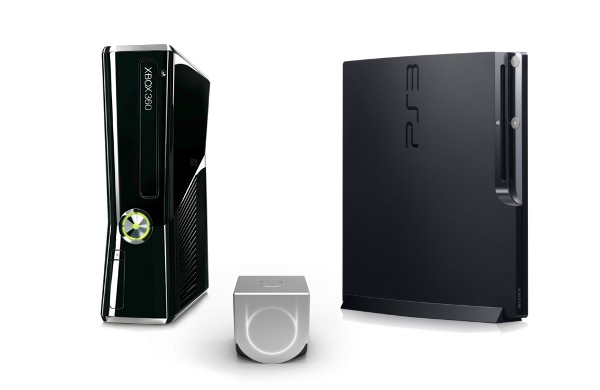
The console has a good weight to it, thanks to the weight placed in the bottom. Otherwise it might feel too light. If you haven't seen the inside of the OUYA yet, check it out. The controller also feels really good to handle. The metal finish components on the top of the controller slide off and each side stores a battery. The top middle flat area is a touch pad for mouse control, which works like a champ.
User Interface
 When you first power on the OUYA, you have to register for a new account or login to your existing account. After you login, there are four menu options: Play, Discover, Make, and Manage. The Play area takes you to the games you have installed and the games you've downloaded waiting to be installed. Discover brings you to the app market with different filters like "Staff Picks" you can navigate through, or you can search by name. Make is the developers section, but it's also where you can access installed applications. If you sideload an app, it'll be available in Make > Software. I'll discuss the process to sideload an app later. Lastly, through Manage, you can connect to wireless networks, check for system updates, and access the advanced menu which is the stock Settings menu in Android 4.1. Through this menu you can access the Storage area for any installed apps or downloaded apps.
As you'll see if you research the OUYA at all, anyone who's experimented with it complains first about the sparse app landscape. The OUYA homepage has a counter in the upper right to inform visitors of the current number of games/apps available, which at the time of this post is at 128. Thankfully, OUYA was developed to be an open platform, so you can sideload apps/games.
Usability
Overall, everything works as expected. I have noticed a slight delay when using the directional pad to navigate through selecting letters when filling in information or navigating through menus. I don't know if it's the controller Bluetooth latency, the directional pad connectivity to the controller board, or the console controller board latency but I find myself having to press the directional pad more than once to accomplish the task at hand. Aside from that, everything else flows smoothly.
Side Loading Apps
IT World has a good write-up on side loading apps, so I don't really have anything new to add there. To sum up, the best way to accomplish this is to throw the .apk file you want to load into a cloud-based file share like Dropbox. Then take the download URL and pop it into a URL shortener service. Once you get the smaller URL, you can open the OUYA browser to access the apk file. Download it, install it, and then open it via Make > Software.
I've found success side loading a Netflix 1.8.1 apk file from the xda forums. I tried 2.1.2 from androiddrawer.com, but it wouldn't install. Interestingly, the 1.8.1 apk shows an OUYA icon when the app is accessed via the Storage manager, but the 2.1.2 apk does not. I may look at them forensically to see what the different is later.
Summary
I'm impressed with the form factor and weight, both inside and out. The user interface is easy to navigate, which is a definite plus. The biggest aspect to the OUYA is its promise of an open gaming system. The biggest downside is that it's a sparse landscape right now. Hopefully it will continue to receive enough media attention to keep that awareness in the forefront of developer's minds. For me personally, it's perfect for travel and I can watch Netflix on it while being on my laptop at same time. I'm eager to see what the future holds for this device!
Friday, March 29, 2013
Labels:
Android
,
Jelly Bean

UPDATE: After re-adding the email settings, it no longer drains my battery. It may be different for other phones, so your mileage may vary. Try re-adding the email account to see what happens. Good luck!
Original post:
On Tuesday night, I received a notification that Verizon published the 4.2.2. update for the Samsung Galaxy Nexus. Having read about the features, I was excited to install the update immediately. The very first thing I noticed was that the phone began getting very hot. I rebooted my phone just before I went to bed, deciding that I would deal with it on Wednesday.
Wednesday was a day of me searching for outlets to keep my phone charged. Within an hour of removing the charging cable, my phone was down to around 10% battery. Looking at the battery usage, "Exchange Services" was eating over 60%! I tried various settings to adjust the sync intervals, all to no avail. Reluctantly, I then removed my corporate email account. I noticed an immediate difference in temperature - or should I say lack thereof; it was no longer burning hot! Monitoring the phone all day Thursday, I can confirm it seems that was the fix.
So, if anyone out there is running a Verizon SCH-i515 Samsung Galaxy Nexus, and your battery drain is as rampant as mine was, delete/remove your corporate email profile.
I haven't tried re-adding it yet. I'll give that a shot Friday and update the post with the test results.
Read More
Verizon's Android 4.2.2 Update and Battery Drain

Original post:
On Tuesday night, I received a notification that Verizon published the 4.2.2. update for the Samsung Galaxy Nexus. Having read about the features, I was excited to install the update immediately. The very first thing I noticed was that the phone began getting very hot. I rebooted my phone just before I went to bed, deciding that I would deal with it on Wednesday.
Wednesday was a day of me searching for outlets to keep my phone charged. Within an hour of removing the charging cable, my phone was down to around 10% battery. Looking at the battery usage, "Exchange Services" was eating over 60%! I tried various settings to adjust the sync intervals, all to no avail. Reluctantly, I then removed my corporate email account. I noticed an immediate difference in temperature - or should I say lack thereof; it was no longer burning hot! Monitoring the phone all day Thursday, I can confirm it seems that was the fix.
So, if anyone out there is running a Verizon SCH-i515 Samsung Galaxy Nexus, and your battery drain is as rampant as mine was, delete/remove your corporate email profile.
I haven't tried re-adding it yet. I'll give that a shot Friday and update the post with the test results.
Tuesday, November 27, 2012
Labels:
Android
,
Google
,
Jelly Bean
Android 4.2 Security: App Signatures
It seems to be common knowledge now among security professionals that the Google Play Store is infiltrated with malware. In an attempt to control the malware surge, Google is stepping up its efforts to clean house via security updates in 4.2.
One central mechanism appears to be signature-based recognition of apk files. When an apk is loaded on a device, the app signature (most likely just a file hash) is uploaded to Google's servers for a reputation check. It's cross-checked against Google's list of known and reported malware, and if found to be bad, the server sends the response to the Android Package Installer to prevent installation. If the reputation states that the app requires suspicious permissions, it'll ask you to confirm that you're comfortable with installing it and list what access it's requesting. ComputerWorld has a more in-depth explanation, for interested parties. The only downside to all this is that unless rooted, we all have to wait on our carriers to release the update through theirvetting marketing process.
This highlights another concept that's rapidly spreading across anyone getting into the software security space: leveraging the user base to protect the cloud. I'll post another note expanding on that concept soon.
Read More
One central mechanism appears to be signature-based recognition of apk files. When an apk is loaded on a device, the app signature (most likely just a file hash) is uploaded to Google's servers for a reputation check. It's cross-checked against Google's list of known and reported malware, and if found to be bad, the server sends the response to the Android Package Installer to prevent installation. If the reputation states that the app requires suspicious permissions, it'll ask you to confirm that you're comfortable with installing it and list what access it's requesting. ComputerWorld has a more in-depth explanation, for interested parties. The only downside to all this is that unless rooted, we all have to wait on our carriers to release the update through their
This highlights another concept that's rapidly spreading across anyone getting into the software security space: leveraging the user base to protect the cloud. I'll post another note expanding on that concept soon.
Subscribe to:
Posts
(
Atom
)


